How to Add a Christmas Countdown to Notion
Notion has no countdown block. To show the days left until Christmas on a page, you embed a small web page that does the counting. Below are the steps for our free Christmas Countdown widget, and what you can change once it is on the page.
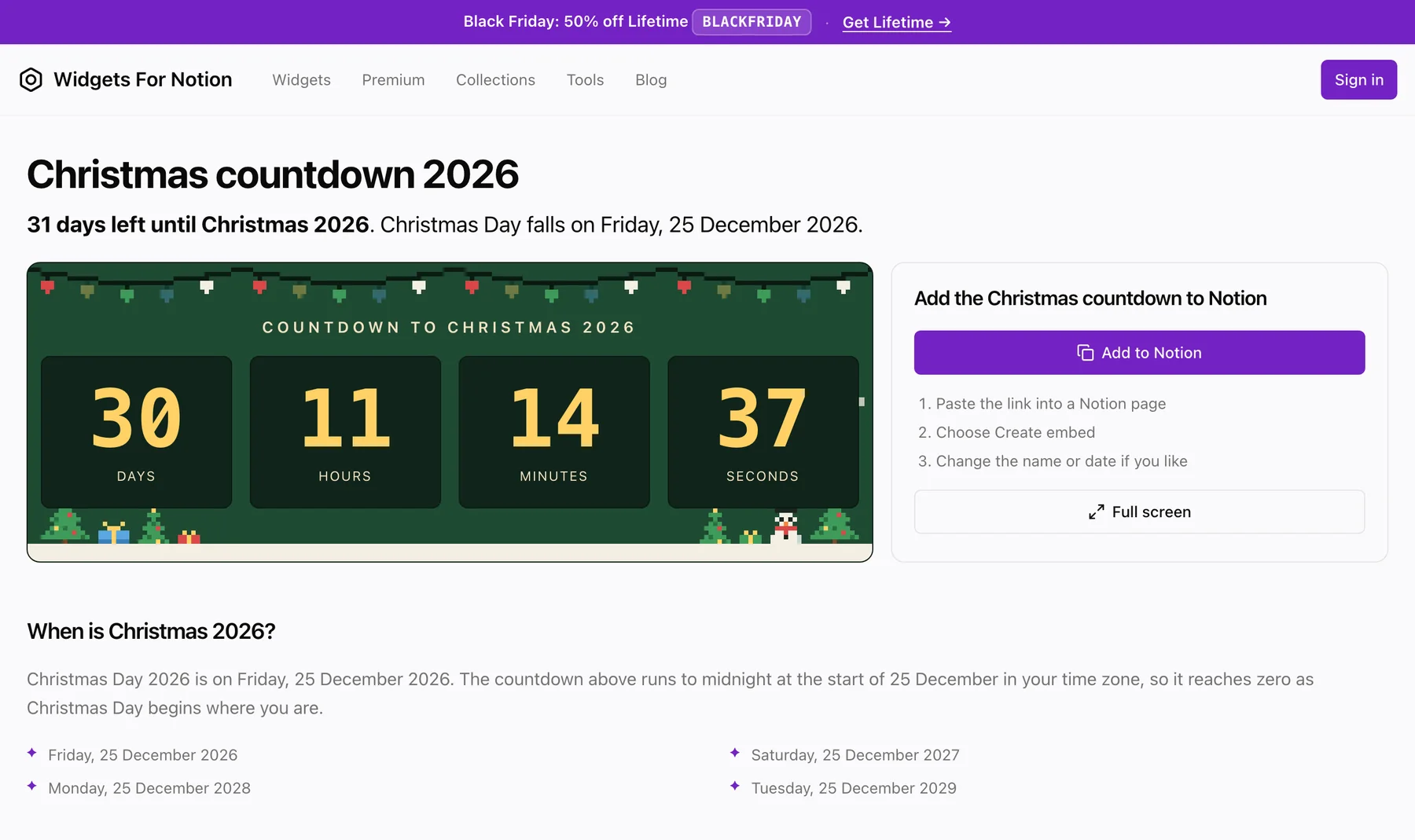
You can see the countdown running on the Christmas countdown page before you add anything.
What the widget shows
The Christmas Countdown counts the days, hours and minutes to 25 December. Gold pixel digits sit on a dark screen inside a pine green card, with a string of lights along the top and trees and gifts in the snow below.
It counts to midnight at the start of Christmas Day in your own time zone, using the clock on your device. Two people in different countries reach zero at different moments, each at their own midnight.
How to add a Christmas countdown to Notion
- Copy the link. Open the Christmas Countdown widget and press Copy embed URL. That copies the widget's link.
- Paste it into Notion. On your Notion page, paste the link and choose Embed in the menu that opens. You can also type
/embed, pick the Embed block and paste the link there. - Resize it. Drag the edges of the embed block until the digits are easy to read. Half the page width works well next to a list or a calendar.
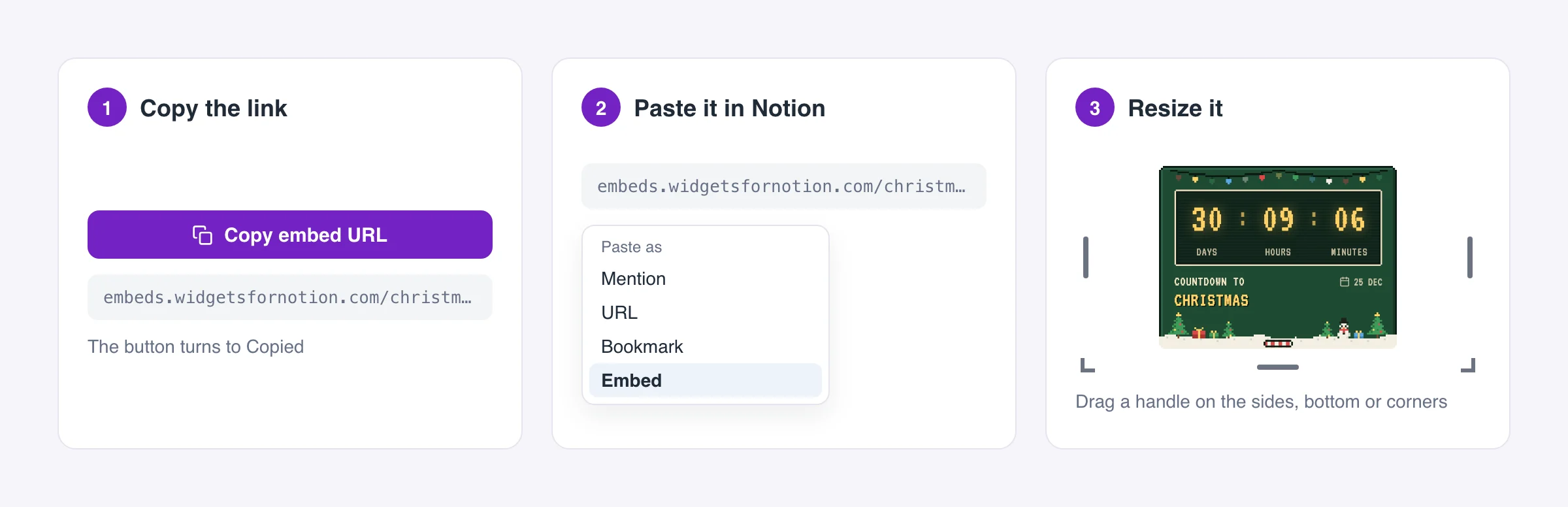
You need no account. The countdown picks up the time again each time the page opens. Our beginner guide to adding widgets to Notion covers what to do if an embed shows up blank, and Notion explains the embed block in its help center.
The live Christmas countdown page
Open the live Christmas countdown when you want the number without opening Notion. It adds seconds to the count, and most browsers can show it full screen. Under the clock it gives the sleeps left, the weeks and weekends left, and the dates on the way to Christmas.
| Notion widget | Countdown page | |
|---|---|---|
| Where you see it | On your own Notion page | In a browser tab |
| What it counts | Days, hours and minutes | Days, hours, minutes and seconds |
| Sleeps, weeks and weekends left | No | Yes |
| Full screen | No | Yes, in most browsers |
| Another name or date | Yes | No, Christmas only |
| Account | None | None |
Christmas 2026 dates
Christmas Day 2026 is a Friday. Most people plan a December page around these dates.
| Date | Day in 2026 | Sleeps left |
|---|---|---|
| First Sunday of Advent | Sunday, 29 November | 26 |
| Advent calendars start | Tuesday, 1 December | 24 |
| One week to go | Friday, 18 December | 7 |
| Christmas Eve | Thursday, 24 December | 1 |
| Christmas Day | Friday, 25 December | 0 |
A sleep is one night, so the sleeps left are the same as the days left on the calendar.
Count down to something else
The widget opens on Christmas, but it is an ordinary countdown underneath. Click the event name and type a new one. Then press the date next to the calendar icon and choose the day. Use it for a holiday party, the day you fly home, or the last day of work before the break.
The widget saves your name and date in the browser you set them in. Open the page on another device and it starts on Christmas again until you set it there too.
On Christmas Day the countdown says Merry Christmas.
Where it fits
Put it at the top of whatever page you open most in December. On a holiday planner it sits well above the gift list. On a shared family page, it gives everyone the same number to look at next to the travel plans.
If you want the same countdown in another style, the countdown widget catalog has the rest of our countdowns.
The rest of the Christmas set
The countdown is one of twelve Christmas widgets for Notion, all in the same pixel art style. The set includes two clocks, a calendar, an advent tracker, a gift list, a habit tracker and a snowman pet. You add each one the same way, by copying its link and pasting it as an embed.
To finish the page, add a banner from our free Christmas Notion covers. Each one is 1500 by 600 pixels, the shape of a Notion page cover.
Questions
Is it free? Yes. The widget is free to embed, views are unlimited, and each copy shows a small Widgets For Notion badge.
Does it work in the Notion phone app? Yes. Embeds show in the Notion app on phones too, and the countdown keeps counting there.
Does everyone on a shared page see the same number? People in the same time zone do. The widget follows the clock of whoever is looking, so a relative eight hours ahead reaches zero eight hours before you.
How many sleeps until Christmas? One more than the days on the widget. The widget counts full days, and tonight is still a sleep. The countdown page has a sleeps box that does the sum.
What happens after Christmas? If you never changed the date, it starts counting to next Christmas on 26 December. If you set your own date, it shows its end message once that date passes and asks you to pick a new one.